


CHEESEBUNKER
Follow our guide to ensure optimum performance.
 Back to Cheat Page
 Getting Started
Make sure to follow all steps below before opening a ticket.
Step 1: Disable Anti Virus (Can also be automated with dControl, follow the steps below.)
- Open Virus & Thread Protection
- Open Manage Settings
- Disable the following below:
- Real-Time Protection
- Cloud-Delivered Protection
- Automatic Sample Submission
- Temper Protection
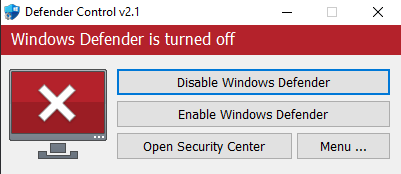
dControl: Disable Anti Virus
- Download it.
- Unzip it. ( Password is: sordum )
- Run dControl.exe as Admin
- Press Disable Windows Defender.
Step 2: Disable Firewall
- Open Firewall & Network Protection
- Disable the following below:
- Domain network
- Private Network
- Public Network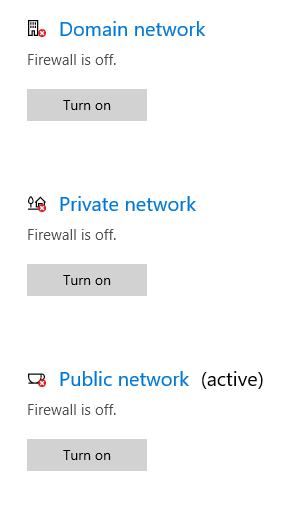
Step 3: Disable App & Browser Control
- Open App & Browser Control
- Disable the following below:
- Check apps and files
- SmartScreen for Microsoft Edge
- SmartScreen for Microsoft Store Apps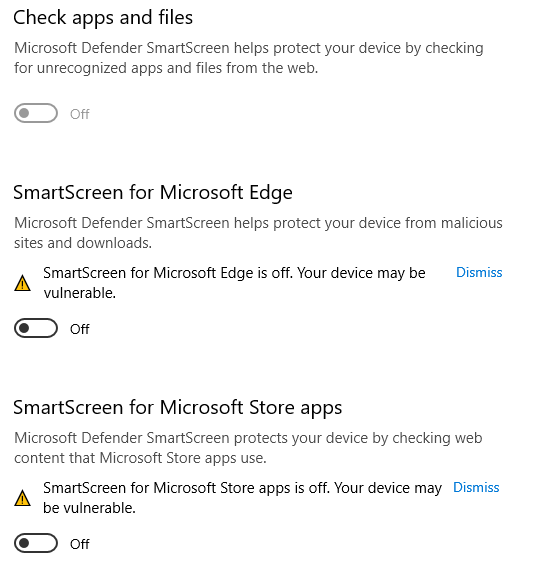
Step 4: Install Winrar
- Download Winrar -> Here
- Run the installer
- Follow the on-screen instructions
Step 5: Install / Update DirectX
- Download DirectX -> Here
- Run the installer
- Disable the option "install bing"
- Follow the on-screen instructions